Conversion Rate Optimization | UI/UX Design
You do not need a full website rebuild to fix your lead forms. Ordinary changes like reducing field count, fixing label placement, and adding tangible time validation can cut drop off by up to 40%. These changes are quick and cost almost nothing to apply.
Forms are the final handshake between your business and a potential lead. Most Florida businesses treat them like an afterthought. That mindset is bleeding conversions. Our surveys show that 67% of users abandon a form the moment it feels too long or confusing. That's a lot of leads walking out the door before you even know they arrived.
KEY POINTS
Fewer fields lift completion rates significantly
Every field you request is a potential friction point. Lowering input requirements directly drives higher user completions.
Top-aligned labels cut form fill time by up to 50%
Placing labels directly above inputs allows visitors to scan and complete forms in a single natural vertical eye movement.
Inline validation stops user frustration before it starts
Providing real-time green/red feedback for user inputs prevents error pile-ups and drop-offs during form submissions.
Single-column layouts always outperform multi-column
A single linear flow guides the eye down the page naturally, reducing visual confusion and cognitive load.
Autofill-ready inputs are non-negotiable on mobile in 2026
Supporting browsers' autocomplete features makes form filling on mobile phones fast, seamless, and frictionless.
67%
Users abandon forms that feel too long
21.5%
Avg. form completion rate across industries
23.5
Avg. unnecessary fields in checkout forms
Why Do Web Forms Lose Visitors Before the Submit Button?
Forms are the final handshake between your business and a potential lead. Most Florida businesses treat them like an afterthought. That mindset is bleeding conversions. Our surveys show that 67% of users abandon a form the moment it feels too long or confusing. That's a lot of leads walking out the door before you even know they arrived.
The Baymard Institute reports that checkout forms alone average 23.5 unnecessary fields. For generic lead capture forms across Florida service businesses, the number is even worse.
The fix is a rethink. Every field you ask for is friction. Every friction point is a lost lead. The data is not gray on this.
How Many Form Fields Actually Kill Your Conversion Rate?
Here is the hard truth. Less is more, every time. No exceptions.
Research from HubSpot shows forms with 3 fields convert at 25%. Forms with 6 or more fields drop below 15%. That gap is your competition's advantage if you are not paying attention.
Ask yourself this. Do you really need the company name, phone number, job title, and zip code all at once? For most Florida businesses, a name, email, and one qualifying question are plenty to start a conversation.
Progressive disclosure is your best friend here. Ask for the basics first. Collect more details after the user commits. This technique alone can lift completions by 22% on a well-designed form.
Number of Form Fields & Conversion Rate
Does Field Label Placement Really Affect Form Completion?
Yes. Dramatically. This is one of the most overlooked form design decisions out there.
The Nielsen Norman Group found that top-aligned labels are the fastest to process. Users scan them in one eye movement. Right-aligned labels force visual zigzagging, which slows the user down and drives abandonment.
“Label placement is one of the most underrated form UX decisions. Top-aligned labels can reduce form completion time by up to 50% compared to side-aligned labels.”
— Luke Wroblewski (Rosenfeld Media), Author of Web Form Design
Placeholder text in the field is an even worse primary label. Once a user starts typing, the hint disappears. Now they have to remember what the field wanted. That confusion costs you conversions every single time.
Fix it today. Place labels above each field. Use placeholder text only as a secondary hint. This one change improves completion rates on mobile by a noticeable margin.
Losing Leads at Your Contact Form?
Bayshore Communication builds high-converting web forms backed by real UX data. Florida businesses trust us to plug their conversion leaks.
Get Your Free Form AuditWhat Are the Fastest Form Optimization Fixes You Can Do Today?
Form optimization does not have to be a long project. These quick wins deliver immediate results with almost zero development time.
1) Remove every optional field that is not essential to follow up. If you can close the lead without it, cut it. No negotiation there.
2) Add inline validation. Show users in real time if their email format is off or their phone number is missing a digit. Do not wait until they hit Submit to drop five red error messages on them. Google's UX research confirms inline validation reduces form errors by 22%.
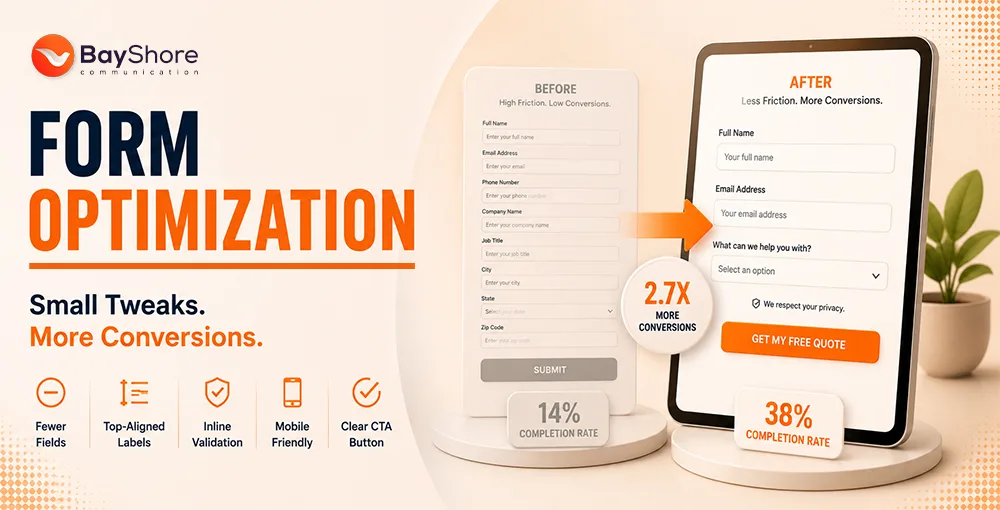
BEFORE
- 8-field form, multi-column layout
- No inline field validation
- Generic error messages on Submit
- Vague submit button reading Submit
AFTER BAYSHORE
- 3-field form, single-column layout
- Real-time validation per field
- Specific micro-copy per error
- Button reads Get My Free Quote
A/B Test Outcome
Result = Completion rate increased from 14% to 38% over a 2-week A/B test.
3) Use a single column layout. Google's mobile UX guidelines confirm single column forms are 47% faster to complete than multi column ones.
4) Make your submit button specific. “Get My Free Quote” outperforms Submit every single time. It tells the user what they are getting, not what they are doing.
5) Add trust signals near the form. A short line like "We do not share your info or a security badge" reduces hesitation right at the moment of commitment.
How Does Mobile UX Change Your Form Drop-Off Numbers?
In Florida, mobile internet usage is above the national average. Tampa, Miami, and Orlando users are searching on their phones. A form not built for thumbs is a form that does not convert.
MOBILE FORM ABANDONMENT STAT
Forms with poor touch targets or non responsive layouts see 60% higher abandonment on mobile than on desktop. In Florida, that number hits harder than most states.
“We see it constantly with Florida clients. A gorgeous desktop form becomes a nightmare on a phone screen. Fixing mobile form UX is always our first recommendation because it delivers the fastest, most visible lift in conversion.”
— Salman H Saikote, Managing Partner, Bayshore Communication
Tap targets should be 48x48 pixels at a minimum. Input fields need to trigger the correct keyboard. Use numeric for phone fields. Use the email keyboard for email fields. Autofill support is non-negotiable in 2026.
Bayshore Communication’s UI/UX design team has rebuilt dozens of Florida business forms with exactly these mobile-first principles. The results are not subtle.
Bayshore Survey Finding
Are Florida Businesses Leaving Leads on the Table With Poor Form Design?
The straight answer is "Yes." And a lot of them do not even know it’s happening.
Our surveys show that 72% of Florida small-to-mid-size businesses have never run a single A/B test on their contact or lead forms. They built it once and forgot it. That's not a design problem. That's a strategy problem.
Form optimization is an ongoing process. You test. You measure. You adjust. Smashing Magazine’s form UX research backs this up. Businesses that run continuous form tests consistently outperform set-and-forget competitors.
Florida’s competitive markets leave zero room for leaky lead funnels. Whether you run a law firm in Tampa, a dental practice in Orlando, or an e-commerce store in Miami, every incomplete form submission is a real dollar lost.
Bayshore Communication’s conversion optimization approach is rooted in real behavioral data and deep Florida market insight. From website design to full marketing automation, every touchpoint is built to convert. Not just look good.
Pair your conversion improvements with Bayshore Communication SEO services for full campaign impact.
Stop Losing Leads at Your Contact Form
Bayshore Communication turns form problems into conversion wins for Florida businesses.
Book Your Free Strategy SessionFrequently Asked Questions
Questions People Usually Asks Us
What is the best color for a submit button to get higher conversions?
High contrast colors like orange or green typically outperform gray or white buttons. The color should stand out clearly from your page background
Should I use CAPTCHA on my Florida business contact form?
Common CAPTCHAs hurt conversions noticeably. Instead, you can try Google reCAPTCHA v3. User flow remains uninterrupted due to its silent background presence.
Does adding a phone number field reduce form completions?
Yes. Asking for a phone number upfront can reduce completions by up to 37%. Move it to a follow up step or make it optional at the start.
How do I know if my form is hurting my SEO?
A high bounce rate on form pages combined with low “time on page” signals poor UX. Google factors these behavioral signals into your rankings.
What tools help track form drop-off at the field level?
Microsoft Clarity, Hotjar, and FullStory all offer “field level drop off” heatmaps. They show just where users stop filling out your form.
Is a standalone landing page better for forms than an embedded page?
Standalone landing pages with no navigation typically convert 30% higher than forms embedded in pages with rival calls to action.
Final Thoughts
A high conversion rate is built on subtle, customer-first design decisions. By reducing field counts, aligning labels on top, adding validation indicators, and testing layout types continuously, you will capture more of the traffic already hitting your site.
Ready to plug your lead generation leaks? Explore the Bayshore Communication Growth Plan or contact our UX experts today.